Steam Deck Software and Operating System Architecture
The Steam Deck is more than just a handheld console; it is a powerful portable computer driven by a sophisticated software ecosystem. By leveraging the flexibility of Linux and a custom-built interface, Valve has created a system that bridges the gap between traditional desktop gaming and the convenience of a portable device.
The Foundation: SteamOS and Arch Linux
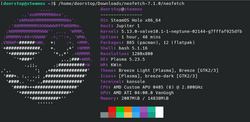
The Steam Deck runs SteamOS version 3, which is built upon Arch Linux. While previous iterations of SteamOS used Debian Linux, Valve transitioned to Arch to utilize its rolling upgrade approach. This allows the system to receive continuous software updates without requiring a full OS reinstall, ensuring the handheld stays current with the latest drivers and features.
To optimize performance, Valve provides a specific Application Programming Interface (API) for developers. This API allows games to detect when they are running on a Steam Deck and adjust settings accordingly. Developers can also provide a special file depot containing lower-resolution textures and reduced assets, which the Steam client automatically downloads to ensure smoother performance on the handheld hardware.
User Interface and Experience
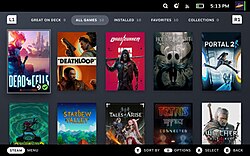
The Steam Deck features a specialized version of the Steam client designed for controller input. Unlike the older Big Picture mode, which was a separate software branch for televisions, the Deck's interface is consistent with the desktop client but enhanced with portable-specific indicators, such as battery life and wireless connectivity status. In February 2023, Valve updated the standard Big Picture mode for all Steam users to match this Deck-inspired interface.
The software supports a wide array of standard Steam features, including cloud saving, user profiles, friends lists, and the Steam Workshop. One notable innovation is Dynamic Cloud Sync, introduced in January 2022. While traditional cloud saving only synchronizes after a game is closed, Dynamic Cloud Sync allows saves to upload while the game is still running, which is essential for a portable device where users may suspend games frequently.
Additionally, the system supports Remote Play, enabling the Steam Deck to act as a controller for games running on a separate PC. For games that do not natively support the Deck's API, the system automatically converts controller inputs, translating the touch-sensitive controls to mimic keyboard and mouse movements.
Game Compatibility and the Proton Layer
While Linux-native games run directly on SteamOS, most Steam titles are developed for Windows. To solve this, Valve utilizes Proton, a compatibility layer that allows Windows games to run on Linux. To ensure a smooth experience, Valve uses a verification system to categorize games based on their performance and stability:
- Verified: Fully playable with no tinkering required and meets minimum performance specs.
- Playable: Functional, but may require minor adjustments (e.g., using the on-screen keyboard).
- Unsupported: Not compatible, often due to VR requirements, Windows-specific codecs, or incompatible software.
Compatibility challenges often arise from anti-cheat software and Digital Rights Management (DRM). Valve has collaborated with middleware providers to resolve this; for example, Epic Games' Easy Anti-Cheat and BattlEye have both implemented support for the Proton layer. In terms of performance, Valve noted that compatible games generally maintain a minimum of 30 frames-per-second, a benchmark comparable to eighth-generation consoles.
The system also supports FidelityFX Super Resolution (FSR), AMD's upscaling technology, to improve visual clarity and performance. While Proton supports Nvidia's DLSS, it is not compatible with the Steam Deck hardware.
Storage and Open Ecosystem
Users can store games on the internal drive or a microSD card, with each treated as a separate Steam Library. This allows users to swap SD cards to change their game library quickly. Since February 2023, users can also download games to the Deck from another Steam installation on the same local network.
Because of its open nature, the Steam Deck is not limited to the Steam store. In Desktop Mode, users can install third-party storefronts such as the Epic Games Store, GOG, Ubisoft Connect, Battle.net, or Origin. The system also supports Microsoft Edge for Xbox Cloud Gaming and can be configured for multi-booting or the installation of an entirely different operating system. Many users also install emulators to play games from other legacy consoles.
Desktop Mode and Third-Party Utilities
The Steam Deck can be switched to a desktop environment powered by KDE Plasma. This mode uses an immutable file system to protect the core OS while allowing users to install third-party utilities. Popular community tools include Decky (a plugin loader), EmuDeck (an emulation manager), and the batocera.linux distribution.
The versatility of the hardware has led to unconventional uses beyond gaming, including serving as a remote control for animatronics at Walt Disney World and operating remote gun turrets for Ukrainian forces during the Russian invasion of Ukraine.
Key Facts
- OS: SteamOS 3 based on Arch Linux (rolling release).
- Compatibility: Uses the Proton layer to run Windows games on Linux.
- Verification: Games are rated as Verified, Playable, or Unsupported.
- Upscaling: Supports AMD FidelityFX Super Resolution (FSR).
- Cloud Tech: Dynamic Cloud Sync allows saving while a game is active.
- Flexibility: Supports third-party stores, emulators, and full OS replacement.
| Feature | Specification/Detail |
|---|---|
| Operating System | SteamOS 3 (Arch Linux) |
| Desktop Environment | KDE Plasma |
| Windows Compatibility | Proton Compatibility Layer |
| Upscaling Tech | AMD FSR |
| Storage Options | Internal Storage & microSD Card |
Frequently Asked Questions
What is the difference between Verified and Playable games?
Verified games work perfectly out of the box and meet performance standards. Playable games work but may require the user to adjust settings or use system controls, such as the on-screen keyboard, to function correctly.
How does the Steam Deck run Windows games?
It uses a compatibility layer called Proton, which translates Windows-based instructions into a format that the Linux-based SteamOS can understand and execute.
Can I install games from other stores like Epic or GOG?
Yes. By switching to Desktop Mode, users can install third-party launchers including the Epic Games Store, GOG, Ubisoft Connect, and others.
What is Dynamic Cloud Sync?
Dynamic Cloud Sync is a feature that allows game saves to be synchronized to the cloud while the game is still running, rather than waiting until the game is exited.
Can the Steam Deck run other operating systems?
Yes, the Steam Deck's open architecture allows users to set up multi-booting or replace SteamOS entirely with a different operating system.