World Wide Web: Architecture, Functionality, and Evolution
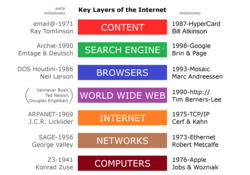
While the terms Internet and World Wide Web are often used interchangeably, they refer to two distinct concepts. The Internet is the underlying global system of interconnected computer networks utilizing telecommunications and optical networking. The World Wide Web, conversely, is a global collection of documents and resources linked by hyperlinks and Uniform Resource Identifiers (URIs), which operates as an application layer on top of the Internet.
Accessing these resources requires specific application-level protocols, namely HTTP (Hypertext Transfer Protocol) or HTTPS (the secure version), which rely on the Internet's transport protocols to move data from a server to a user's screen.
Key Facts
- The Internet is the hardware and networking infrastructure; the Web is the collection of linked content.
- HTML, CSS, and JavaScript are the three cornerstone technologies of the Web.
- DNS (Domain Name System) translates human-readable URLs into machine-readable IP addresses.
- Static pages are delivered exactly as stored, while dynamic pages are generated in real-time by server-side software.
- WDM (Wavelength-Division Multiplexing) significantly increased network capacity by allowing multiple data channels on a single fiber.
How the Web Works: From URL to Screen
The process of viewing a web page, often called "browsing" or "web surfing," involves a complex series of background communications. When a user enters a URL (Uniform Resource Locator) like http://example.org/home.html, the web browser first contacts the Domain Name System (DNS) to resolve the server name into an Internet Protocol (IP) address (e.g., 203.0.113.4).
Once the IP address is known, the browser sends an HTTP request to the server. This request is directed to a specific TCP port—typically port 80 for HTTP and port 443 for HTTPS—to ensure the server recognizes the request as web traffic. The web server software then processes the request and sends back an HTTP response containing the page content.
Rendering the Page
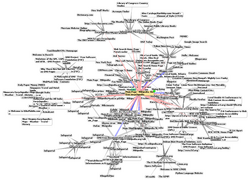
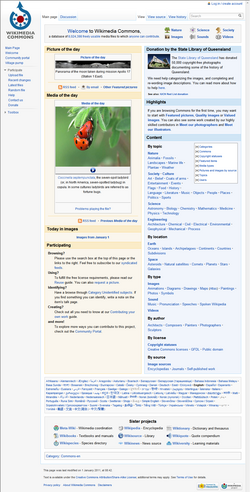
The content is usually delivered as Hypertext Markup Language (HTML). The browser parses this markup to format text and identifies references to other resources, such as images, scripts, and Cascading Style Sheets (CSS), which define the layout. The browser makes additional requests for these elements and progressively renders the final page on the screen.
Core Technologies: HTML, CSS, and JavaScript
The modern web relies on a triad of technologies to create functional user experiences:
- HTML: The standard markup language used to describe the semantic structure of a web page.
- CSS: Used for the visual presentation and layout. The World Wide Web Consortium (W3C) has promoted CSS over presentational HTML since 1997.
- JavaScript: A scripting language developed in 1995 by Brendan Eich that enables interactive behavior and dynamic content updates.
Types of Web Pages and Websites
A website is a collection of related resources identified by a common domain name and published on one or more web servers. These sites are composed of individual web pages, which fall into two primary categories:
Static Web Pages
A static page (or flat page) is delivered to the user exactly as it is stored on the server's file system. Every user sees the same content regardless of context, unless the server is specifically configured to negotiate language or content-type.
Dynamic Web Pages
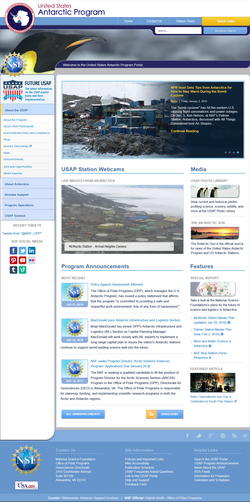
Dynamic pages are generated by web applications. These can be server-side, where scripts (such as PHP and MySQL) assemble the page based on specific parameters, or client-side, where JavaScript interacts with the Document Object Model (DOM) to alter the page state in the browser.
Techniques like Ajax (Asynchronous JavaScript and XML) allow pages to request small amounts of data from the server without reloading the entire page, creating a more fluid user experience.
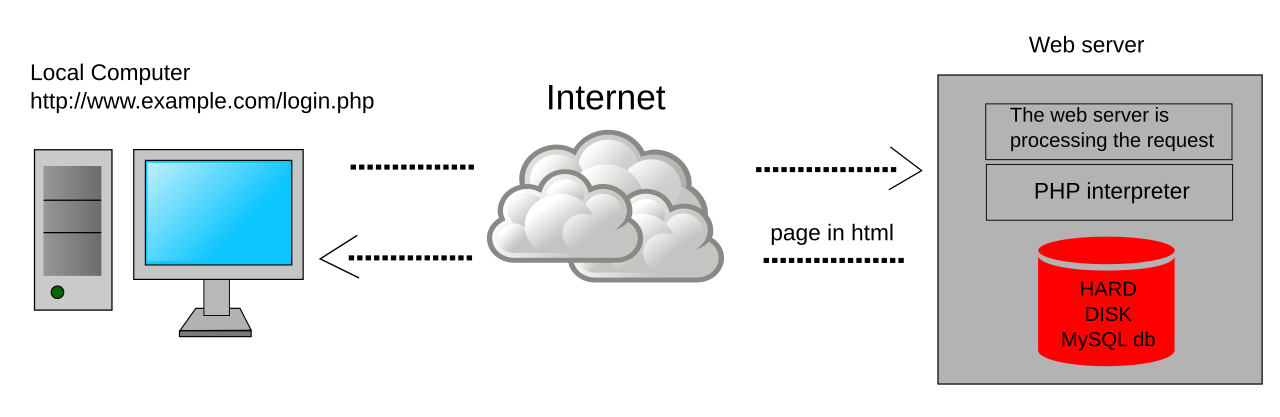
Web Infrastructure: Browsers and Servers
A web browser (such as Chrome, Safari, Edge, or Firefox) acts as the user agent that downloads, formats, and displays web pages. Beyond rendering, browsers manage bookmarks, history, and cookies.
A web server is the hardware or software that satisfies client requests. While often large rack-mounted computers, web servers can also be embedded in devices like routers or printers for local administration.
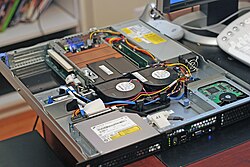
For high-traffic websites, multiple servers are often used in clusters to handle the load. This is frequently managed using a CNAME record in the DNS, which allows a subdomain (like www) to point to a cluster of servers for load balancing.

The Evolution of Connectivity and Search
Optical Networking and WDM
The transition from the research-focused ARPANET and NSFNET to a privatized commercial Internet in the 1990s created a massive demand for bandwidth. To solve this, companies like Pirelli S.p.A. and Ciena Corporation developed Wavelength-Division Multiplexing (WDM). This technology allows multiple data channels to be sent simultaneously over a single optical fiber, vastly increasing network capacity.
Finding Information
The first search engine, Archie, was released in 1990 as an index of FTP sites. This evolved into the sophisticated engines we use today, such as Yahoo! (1995) and Google (1998).
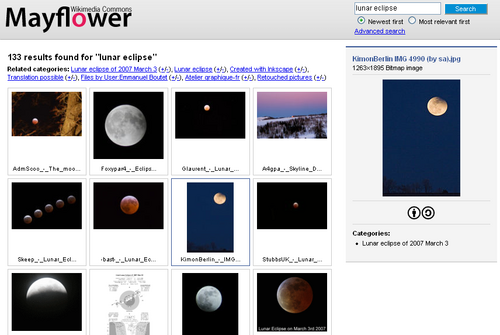
However, not all content is searchable. The deep web (or invisible web) consists of pages not indexed by standard search engines, often requiring passwords or direct URLs to access. This is distinct from the surface web, which is accessible to any general search query.
Summary of Web Components
| Component | Primary Function | Example/Technology |
|---|---|---|
| Protocol | Governs data transfer between client and server | HTTP / HTTPS |
| Markup Language | Defines page structure and content | HTML |
| User Agent | Requests and renders web pages | Web Browser (e.g., Chrome) |
| Host | Stores and delivers web resources | Web Server |
| Addressing | Translates domain names to IP addresses | DNS |
Frequently Asked Questions
What is the difference between the Internet and the World Wide Web?
The Internet is the global network of hardware and infrastructure (cables, routers, etc.), while the World Wide Web is a service that runs on that infrastructure, consisting of linked documents accessed via HTTP.
Why do many websites start with "www"?
The "www" prefix was a long-standing practice of naming hosts based on their service (similar to "ftp" for FTP servers). It was largely accidental, stemming from early DNS records at CERN, and is not a technical requirement.
What is "link rot"?
Link rot occurs when hyperlinks become obsolete because the destination resource has been moved, deleted, or replaced, resulting in "dead" links.
What is the difference between a static and a dynamic web page?
A static page is a fixed file delivered exactly as stored on the server. A dynamic page is generated in real-time by a web application, allowing different users to see different content (e.g., a banking portal).
What is the deep web?
The deep web refers to parts of the World Wide Web that are not indexed by standard search engines, often because they are protected by passwords or reside behind a database.