iOS 11: A Comprehensive Look at the Legacy Operating System
Released by Apple on September 19, 2017, iOS 11 represented a significant shift in how users interacted with their mobile devices. While it served as the foundation for the iPhone 8 and the groundbreaking iPhone X, it also brought a heavy emphasis on transforming the iPad into a more productive tool. Though now obsolete and unsupported, iOS 11 introduced several architectural changes and user interface refinements that influenced subsequent versions of Apple's mobile software.
Key Facts
- Initial Release: September 19, 2017.
- Final Version: 11.4.1, released July 9, 2018.
- Major Shift: Dropped support for all 32-bit applications.
- Key Introduction: The Files app, allowing for better document organization on iPad.
- Hardware Debut: Launched alongside the iPhone 8, 8 Plus, and iPhone X.
- Kernel: Based on the XNU hybrid kernel.
System-Wide Enhancements
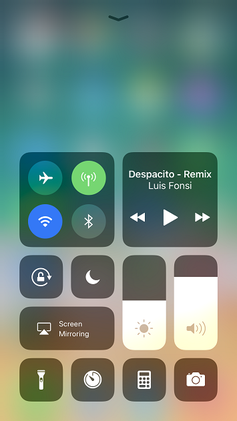
iOS 11 overhauled several core system components to streamline the user experience. One of the most visible changes was the Control Center, which was redesigned to consolidate all toggles onto a single page and allowed for deeper user customization.
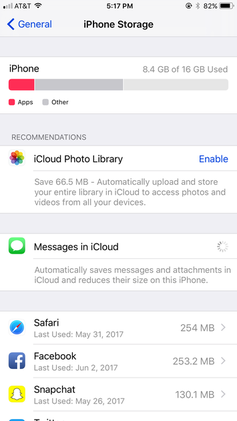
The system also introduced a new approach to storage management. Users were provided with personalized recommendations in the Settings menu to help clear space more efficiently.
iPad Productivity and Multitasking
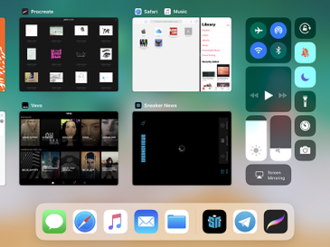
Apple utilized iOS 11 to bridge the gap between mobile and desktop productivity on the iPad. The introduction of a redesigned Dock allowed users to see recently used apps, while the multitasking interface was refined for better efficiency.
Input and Accessibility
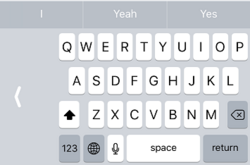
The system keyboard received updates, including a one-handed mode to accommodate larger screen sizes, and new Shuangpin keyboard layouts for improved input.
Major App and Feature Updates
Beyond system settings, iOS 11 brought substantial changes to native applications. The App Store underwent a complete redesign, moving away from a tab-based layout to a more editorial, content-driven experience.

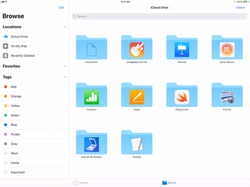
Perhaps the most significant addition was the Files app. This application allowed users to browse, search, and organize files stored both locally on the device and within iCloud Drive, bringing a traditional file-system feel to the iPad.
Augmented Reality and Media
iOS 11 introduced ARKit, a powerful framework for Augmented Reality (AR) that allowed developers to place virtual objects in the real world. Additionally, the Photos app gained support for HEIF (High Efficiency Image File Format) and HEVC (High Efficiency Video Coding) to reduce storage consumption without sacrificing quality.
Technical Specifications and Compatibility
iOS 11 was compatible with a wide range of devices, though it notably dropped support for the iPhone 5, iPhone 5c, and the 4th generation iPad.
| Device Category | Supported Models |
|---|---|
| iPhone | iPhone 5s, 6, 6 Plus, 6s, 6s Plus, SE (1st gen), 7, 7 Plus, 8, 8 Plus, X |
| iPod Touch | iPod Touch (6th generation) |
| iPad | iPad Air, Air 2, (2017), (2018), Mini 2, 3, 4, Pro (9.7", 10.5", 12.9" 1st & 2nd gen) |
Version History and Evolution
The lifecycle of iOS 11 saw several critical updates. Version 11.0 established the baseline, while 11.1 added over 70 new emoji characters. Version 11.2 introduced Apple Pay Cash in the USA and improved wireless charging for the iPhone 8 and X series.
Version 11.3 brought Animoji (including Lion, Bear, Dragon, and Skull) and a Beta version of iPhone Battery Health, which recommended battery replacements based on capacity. The final release, 11.4.1, focused primarily on security patches and reliability improvements for Exchange accounts.
Challenges and Reception
Despite its innovations, the rollout of iOS 11 was marred by several software bugs. Users reported significant battery drain issues and inconsistencies in the keyboard's autocorrect functionality. Technical glitches also appeared in the Calculator app, where rapid typing could lead to incorrect results. Additionally, a vulnerability in HomeKit was identified in version 11.2, and some users experienced crashes in December 2017.
Frequently Asked Questions
What was the most significant change for iPad users in iOS 11?
The most significant change was the introduction of the Files app, which allowed users to organize and manage documents across the device and iCloud Drive, alongside a redesigned Dock for better multitasking.
Which devices were no longer supported starting with iOS 11?
iOS 11 dropped support for the iPhone 5, iPhone 5c, and the iPad (4th generation).
What happened to 32-bit apps in iOS 11?
iOS 11 completely ceased support for 32-bit applications, meaning only 64-bit apps could be launched on the operating system.
What is ARKit and how did it impact iOS 11?
ARKit is a developer framework that enabled Augmented Reality experiences, allowing apps to place virtual objects into the real-world environment using the device's camera.
Did iOS 11 introduce any battery management tools?
Yes, version 11.3 introduced a Beta version of iPhone Battery Health, which provided users with recommendations on whether their battery needed replacement.